Hello Readers, Tech-Attacks is back with a new topic to open banned or blocked websites.
You can also check some other Articles on same topic(links mentioned below)
http://techattacks4u.blogspot.in/2012/09/open-banned-websites-without-any-proxy.html
http://techattacks4u.blogspot.in/2012/11/get-access-to-blocked-websites-by.html
Several Simple Steps to unblock websites are described below:
Note: Below mentioned steps can be done only on Windows Operating System.
1) Click Start and open Control Panel
2) Find Network and Internet and then Click on Network and Sharing Center
Showing posts with label Open Banned Websites. Show all posts
Best Free Fast Proxy Websites List - Open Blocked Websites Using Proxies

Hello, readers from a long time some of our readers are demanding several secure proxies or proxy webs by which they can FREELY & SECURELY browse sites.
So, here is a list for all to Browse internet being Fully ANONYMOUS or UNDETECTABLE.
For more related stuff simply Like Tech-Attacks on Facebook or Follow us on our Blog .
Get Access to Blocked Websites by Changing Proxy for FREE
Today I'ill show you to Open Block Site On internet.
Like if some Countries Block those site which they Dont Like.
( Just Like YOUTUBE - PAKISTAN BLOCKED YOUTUBE FOR UPLOADING ANTI-ISLAMIC FILM ON YOUTUBE )
Moreover several Friends asks me many time that in their school/collages/office computers they cant access several Websites.So, here is an article for those who want access on Blocked Websites.
Open Banned Websites Without Any Proxy or Software
How to visit banned websites? this is a question that comes to mind
whenever people realize that their favorite website is banned in the
university, college, office or even at home sometimes.
These websites may be banned for several reasons, sometimes to avoid people from wasting their time rather then working or studying or perhaps due to governmental factors. Also, web sites with articles that breaks trademark or other perceptive residence privileges are often clogged in some parts.
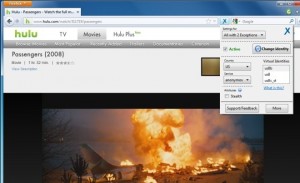
This event can be quite aggravating for many customers, as they cannot accessibility a lot of articles online, but with " AnonymoX ", a Industry add-on, you can use of all such web sites by surfing around the web anonymously.
With it, you can modify your IP deal with, place and check out web sites that are clogged or unavailable in your nation. You can modify the IP and place with only a few easy important without having to use proxy servers.
All you need to do is either press the pink choice next to the look for bar or in the add-on bar, and press Change Personality to get a new IP Address. Also, remove treats by merely simply clicking the More choice.
If you don’t want to use AnonymoX on certain websites, simply click the blue button and select your website from the Settings for drop-down menu, and uncheck the Active option.
You can also change the country and the service for individual websites. Click More to change settings for cookies and user agents.

These websites may be banned for several reasons, sometimes to avoid people from wasting their time rather then working or studying or perhaps due to governmental factors. Also, web sites with articles that breaks trademark or other perceptive residence privileges are often clogged in some parts.
This event can be quite aggravating for many customers, as they cannot accessibility a lot of articles online, but with " AnonymoX ", a Industry add-on, you can use of all such web sites by surfing around the web anonymously.
With it, you can modify your IP deal with, place and check out web sites that are clogged or unavailable in your nation. You can modify the IP and place with only a few easy important without having to use proxy servers.
All you need to do is either press the pink choice next to the look for bar or in the add-on bar, and press Change Personality to get a new IP Address. Also, remove treats by merely simply clicking the More choice.
If you don’t want to use AnonymoX on certain websites, simply click the blue button and select your website from the Settings for drop-down menu, and uncheck the Active option.
You can also change the country and the service for individual websites. Click More to change settings for cookies and user agents.

Subscribe to:
Posts (Atom)