
 Hello, Readers Today we are sharing The world's Richest Tech Billionaires according to Forbes. These people changed the digital era by providing innovative technology. The Interesting fact about these billionaires is some of them are College dropouts from famous universities
Showing posts with label Facebook. Show all posts
Showing posts with label Facebook. Show all posts
Top 10 World's Richest Tech Billionaires 2013 - News Article
Hello, Readers Today we are sharing The world's Richest Tech Billionaires according to Forbes. These people changed the digital era by providing innovative technology. The Interesting fact about these billionaires is some of them are College dropouts from famous universities

Phishing Facebook Gmail Yahoo Hotmail Account / Create Facebook Phishing pages

Today Tech-Attacks will tell you about the famous hacking technique called "Phishing".
In this technique hackers just make a fake page of any website to hack
user account , then if user enter his/her account name and password
hacker get the account details and hack the account of user.
Before starting we just want to tell you that this information is for only knowledge not for the practical use.I will tell you how to create phishing pages for facebook. To view demo visit View demoSteps to create a phishing page of facebook:
Change Your Facebook Layout with Amazing Themes & Skins
 If you are tired of your white Facebook background & blue layout then you can change whole layout of your Facebook using some amazing & nice collection of Themes & Skins.
Facebook is a most popular social networking site where we love to stay & spend more & more time, and there is no doubt that you are bored with blue-white layout of Facebook. But using a simple Add-on (for Firefox) & Extension (for Chrome) you can choose from thousands of Themes & Skins & Background.
How to Change Theme & Layout of Facebook ?
Send too many Friend requests in just one click on Facebook even if you are Blocked

Facebook Timeline Covers for Hackers
Hello Readers, In this Article Tech-Attacks is going to share some Hackers Facebook Covers.
HTC First with Facebook Home - The Facebook Phone First Review
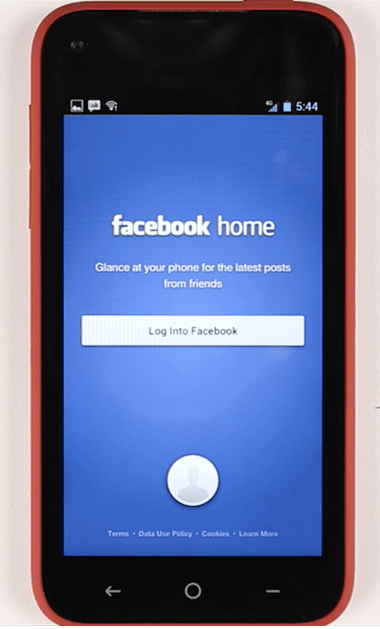 After years of rumors, the Facebook Phone aka the HTC First finally launches April 12th on AT&T . It’s light and supple, plus comes with a suped-up version of Facebook Home pre-installed that pipes in non-Facebook notifications, but the 5MP Camera is a let down. If you’re highly social, want a mid-range handset, crave email alerts, and aren’t a photo buff, the First could be a great fit.
Considering this is Facebook’s first time really getting its hands dirty with a handset, I was very impressed with the First. Its comfy feel and soft edges make it a joy to hold. The 720p, 341 PPI screen is sharp, though not blazingly bright.
Check For More Gadget Reviews -> Tech-Attacks Gadget Reviews.
Facebook Hacking E-Book & Facebook Tips & Tricks E-Book (FREE Download)
Hello Readers, Here's our new Books :
Hacking With Experts 3 (Facebook Hacking)
Note: Books Listed on Today's Article are made by Anurag Dwivedi (Indian Hacker / Programer), Whole Credit goes to him, We Tech-Attacks are just going to provide you his book's FREE Download link & Contents of it.
Note: Books Listed on Today's Article are made by Anurag Dwivedi (Indian Hacker / Programer), Whole Credit goes to him, We Tech-Attacks are just going to provide you his book's FREE Download link & Contents of it.
B. Facebook Tips / Tricks
Check Other E-Books on Tech-Attacks by clicking here -> Tech-Attacks E-Books.
Contents :
Earn Online via Blog, Facebook Posts, Tweets, Youtube Videos or any relevant traffic

MyLikes is a social media advertising platform for advertisers and social publisher.
In the beginning mylikes was very popular and highly paying. It used to pay twice a week directly to paypal and minimum payout was only 2$.Before reading further article Please take a second to Bookmark TechAttacks for your later use or For more Updates Follow us on our BLOG or get tuned by simply Liking Tech-Attacks on Facebook.
Send SMS through Facebook for FREE
There are lots of websites over the
internet that offers Free SMS (Short Messaging Service) or even
anonymous SMS services. But you will be amazed to know that your all
time favorite Social Networking website Facebook also offers Free sms
service. You can send SMS all around the globe for Free. There is a
Facebook Application ChatSMS that provides this awesome feature.
The limitation of this App is that you can send only 100 character long SMS.
The whole procedure to send SMS via Facebook is described below and for regarding stuffs stay in touch with our Blog . or get tuned by simply Liking Tech-Attacks on Facebook or take a second to Bookmark TechAttacks for your later use.
How to Send Free SMS via Facebook :
The limitation of this App is that you can send only 100 character long SMS.
The whole procedure to send SMS via Facebook is described below and for regarding stuffs stay in touch with our Blog . or get tuned by simply Liking Tech-Attacks on Facebook or take a second to Bookmark TechAttacks for your later use.
How to Send Free SMS via Facebook :
Delete Facebook Account Permanently
You might be using Facebook as you know
Facebook is the world’s famous social network on Internet. It is let you
stay connect with your favorite peoples. And you can also promote your
business with Facebook.
We Tech-Attacks are also on Facebook just for you guys (dont forget to like/follow us to get more updates).
Basic Difference between Deactivation & Deleting Account?
Deleting Account: it works permanently, once you deleted your every data will be remove from Facebook server and you can never able to log in or get back your account again, there is many personal reasons for a common users so I am sharing this Facebook feature because officially there is no option in account setting in actual this feature is official but it is on separate help page.
Prepare Your Account Before or For Deleting.
Manage Groups & Pages : May be you have owned some pages and groups and using it for business or personal entertainment you must have to prepare it or transfer it to another so you can access it back later.
That advices I given you because after deleting account you feel free.
Make Backup Before Doing Anything : Backup Facebook Account Data
Here is the Official Facebook Help Page Link from there you can get help to delete your Facebook account :
Remove Spam & Unwanted Apps on Facebook and Keep your Profile Secure
Facebook is famous communication where every peoples stay connect with their relationships.
We Tech-Attacks are also on Facebook just for you guys(dont forget to like/follow us to get more updates).
Facebook also use for promoting their business or products different kind of products and business like we use Tech-Attacks fan page to get some traffic from Facebook same like some people use it. But mostly peoples pay money to Facebook for promotion but there is many spammers peoples who are making unwanted apps with fake names and accounts for promote their black hat bad stuffs. Like chat bots, mass messages it is uses for spamming links and time waste messages that can disturb your life too much. If you have added your family or some respected relations to your profile you should not take risk to open that kind of bad links or messages

Spammers peoples make applications first with Facebook api Facebook api is free even you can also build up your free app on Facebook. So spammers make apps and use vps servers
to upload their private scripts and share some urls with messages and
innocent peoples click on it and get infected with bad stuff their
account start spamming links automatically and your respect get down
because of it and may be many of your friends may delete you immediate.
We Tech-Attacks are also on Facebook just for you guys(dont forget to like/follow us to get more updates).
Facebook also use for promoting their business or products different kind of products and business like we use Tech-Attacks fan page to get some traffic from Facebook same like some people use it. But mostly peoples pay money to Facebook for promotion but there is many spammers peoples who are making unwanted apps with fake names and accounts for promote their black hat bad stuffs. Like chat bots, mass messages it is uses for spamming links and time waste messages that can disturb your life too much. If you have added your family or some respected relations to your profile you should not take risk to open that kind of bad links or messages
Remove Unwanted Apps
How Spammers spread their bad stuffs?
How to Remove and keep Secure Account
Create Your 1st and Simple Facebook Application - Tutorial
This tutorial will explain you how you can create a free Facebook Application. Its free / 0$ of cost, as you know Facebook is very popular communication on internet and most famous social network site with 1000 of features, peoples earning thousands of dollars daily from Facebook Applications.
So lets start this tutorial and make a application, some time we need to make application when we use Facebook comments or wall poster systems on our blogs or web sites.

Building Facebook Application Tutorial Step by step is as described
So lets start this tutorial and make a application, some time we need to make application when we use Facebook comments or wall poster systems on our blogs or web sites.
Building an app on Facebook gives you the opportunity to deeply
integrate into the core Facebook experience. Your app can integrate with
many aspects of Facebook.com, including the News Feed and
Notifications. All of the core Facebook Platform technologies, such as Social Plugins, the Graph API and Platform Dialogs are available to Apps on Facebook.
Building Facebook Application Tutorial Step by step is as described
How to find Who Is Online On Facebook
Note: Facebook Tricks - Tested & 100% working till this date :P
Many Friends this days ask me, that How to see Who Is Online On Facebook While they appear Offline
Well Friends Solution is just 3 steps ahead :
First of all Login the Facebook and after that, go for offline chat in Facebook account.
Now Go to http://www.facebook.com/onlinenow page.
Like it and then click "Go To App" button there, which is next to like button
Click on Allow, if its asking for permission
After installing this application you are able to see, who is online on Facebook even when you are offline on your Facebook account.
Many Friends this days ask me, that How to see Who Is Online On Facebook While they appear Offline
Well Friends Solution is just 3 steps ahead :
First of all Login the Facebook and after that, go for offline chat in Facebook account.
Now Go to http://www.facebook.com/onlinenow page.
Like it and then click "Go To App" button there, which is next to like button
Click on Allow, if its asking for permission
After installing this application you are able to see, who is online on Facebook even when you are offline on your Facebook account.
How to Insert Image in Facebook Login Background
Note: Facebook Tricks - Tested & 100% working till this date :P
If you guys are bored watching the same Facebook Login screen and wanna Customize it by your own way.
Then there is a trick to Insert Image in Facebook Login Background and watching completely different login screen in just 3 simple steps.
First Download FB Refresh Google Chrome Plugin (Works on Google Chrome only)
Than go to Facebook extension page find FB Refresh Extensions and click on options link.

Enter your Image URL in the Box and Click save.
Now Visit Facebook.com
Note: If it Appears the same(no change) then, press control + f5 (Its not refreshing Page, its to reload page.).
If you guys are bored watching the same Facebook Login screen and wanna Customize it by your own way.
Then there is a trick to Insert Image in Facebook Login Background and watching completely different login screen in just 3 simple steps.
First Download FB Refresh Google Chrome Plugin (Works on Google Chrome only)
Than go to Facebook extension page find FB Refresh Extensions and click on options link.
Enter your Image URL in the Box and Click save.
Now Visit Facebook.com
Note: If it Appears the same(no change) then, press control + f5 (Its not refreshing Page, its to reload page.).
How to find, if someone unfriend you on Facebook
Note: Facebook Tricks - Tested & 100% working till this date :P
Many Friends this days ask me, that How to find, if someone unfriend them on Facebook
Solution is just 3 steps ahead :
First go to: http://www.outandin.info/ and click “Login with Facebook” (check the box on the conditions of service [Terms of use]).
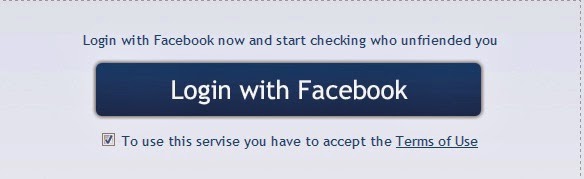
Click on Allow

Many Friends this days ask me, that How to find, if someone unfriend them on Facebook
Solution is just 3 steps ahead :
First go to: http://www.outandin.info/ and click “Login with Facebook” (check the box on the conditions of service [Terms of use]).
Click on Allow

Facebook Hacking E-Book (Free Download)
About
The Author :
This Book Was written by Raj Chandel, Raj Chandel started his career at a very young age of 18 since then he has performed the roles of experienced Ethical Hacker, Cyber Security Expert, Penetration Tester.
He has also served IT industry by taking care of Network Security , System Security, SEM with a first hand experience of 3 years in Web Developement, Ethical Hacking and Internet marketing .
- Hope you guys Enjoy the E-book
Click the below Link to Download E-book for Free :
This Book Was written by Raj Chandel, Raj Chandel started his career at a very young age of 18 since then he has performed the roles of experienced Ethical Hacker, Cyber Security Expert, Penetration Tester.
He has also served IT industry by taking care of Network Security , System Security, SEM with a first hand experience of 3 years in Web Developement, Ethical Hacking and Internet marketing .
- Hope you guys Enjoy the E-book
Click the below Link to Download E-book for Free :
Change Your Facebook Profile Color
For Changing your Facebook Profile Colour
1st you have to Download Greasemonkey (Needs Mozilla Firefox)
which is available here = https://addons.mozilla.org/firefox/addon/748
Restart Firefox (close app and open again)
Download Facebook Auto Colorizer
which is available here = http://userscripts.org/scripts/source/3626.user.js
And your’e done!
Go to Facebook, and you will definitley see a change!
1st you have to Download Greasemonkey (Needs Mozilla Firefox)
which is available here = https://addons.mozilla.org/firefox/addon/748
Restart Firefox (close app and open again)
Download Facebook Auto Colorizer
which is available here = http://userscripts.org/scripts/source/3626.user.js
And your’e done!
Go to Facebook, and you will definitley see a change!
Note:- You Can see this change only your computer.
Subscribe to:
Posts (Atom)
